Why Background Removal Matters for Fashion E-commerce
Every fashion product listing starts with one thing: a clean product image. Whether you sell on Amazon, Shopify, Zalando, or your own DTC store, background removal is the single most-performed image editing task in fashion e-commerce. It is the foundation of every product detail page, every catalog, and every marketplace listing.
A clean, consistent background keeps attention on the garment. On a category grid, where a shopper scans a dozen tiles in a few seconds, a cluttered or inconsistent backdrop is the difference between the product being compared and the product being skipped.
Marketplaces like Amazon actively suppress listings with non-compliant images. For fashion brands managing hundreds or thousands of SKUs, background removal is not a creative choice. It is an operational necessity. The question is not whether to remove backgrounds — it is how to do it at scale without destroying image quality or blowing through your production budget.
This guide breaks down why generic AI background removal tools consistently fail on fashion images, what fashion-trained AI does differently, and how to build a background removal workflow that handles your entire catalog.
The Problem with Generic Background Removal Tools on Clothing
Generic AI background removal tools — remove.bg, Adobe Express, Canva's background remover — work well enough on solid objects. A coffee mug, a phone case, a pair of headphones. These have hard, defined edges that any segmentation model can detect.
Fashion is different. Clothing introduces a category of visual complexity that generic models were never trained to handle:
- Semi-transparent fabrics: Chiffon blouses, organza overlays, and sheer panels confuse generic tools because the background is partially visible through the garment. The AI cannot decide where the product ends and the background begins, resulting in either clipped fabric or retained background patches.
- Lace and mesh details: Lace dresses, mesh inserts, and crochet pieces have intricate open patterns. Generic tools either fill in the holes (destroying the design) or erase the lace entirely, treating it as background noise.
- Flowing and feathered edges: Silk scarves, pleated skirts, and ruffled hems create soft, irregular boundaries. Generic AI tends to snap these to hard edges, producing an unnatural cutout that looks obviously edited.
- Fringe, tassels, and embellishments: Fringed jackets, beaded details, and tassel earrings have dozens of fine strands that generic tools either clip off entirely or merge into a blocky mass.
- Color similarity: A white blouse on a white background, a black dress on a dark studio backdrop — when the garment and background share similar tones, generic tools lose the boundary and produce jagged, inaccurate cutouts.
- On-model hair boundaries: For on-model fashion photography, generic tools struggle where hair meets the garment or background, creating visible halos or eating into the model's hair.
The result? Hours spent manually fixing AI outputs that were supposed to save time. For brands processing product images at scale, generic tools create more rework than they eliminate.

Fashion-Trained AI vs Generic AI: The Quality Difference
The difference between generic and fashion-trained AI background removal comes down to training data and model architecture. Generic tools are trained on broad image datasets — animals, objects, people, landscapes. Fashion-trained AI is built on millions of garment images across every fabric type, garment category, and photography style.
Here is what that training difference produces in practice:
| Challenge | Generic AI Result | Fashion-Trained AI Result |
|---|---|---|
| Lace dress edges | Lace holes filled in or lace deleted | Open lace pattern preserved with clean transparency |
| Sheer chiffon sleeve | Sleeve partially erased or background bleeding through | Semi-transparency maintained with accurate fabric boundary |
| White shirt on white BG | Jagged edges, lost collar/cuff detail | Clean separation with garment structure intact |
| Fringed hem | Fringe strands clipped to a hard line | Individual fringe strands preserved |
| Pleated skirt | Pleat shadows misread as background | Pleat depth and shadow detail retained |
| Beaded embellishment | Beads merged into flat surface | Individual bead definition maintained |
Standard garments on a clean background are close to solved for any modern tool. The difference between fashion-trained models and generic ones shows up on the categories listed above — lace, mesh, layered fabrics, loose hair, and semi-transparent panels — where generic cut-outs tend to fill in holes, harden soft edges, or erase sheer sections entirely. Judge a tool on those, not on a plain cotton tee.
The practical impact: fashion-trained AI eliminates the manual touch-up step. What comes out of the model is production-ready — not a rough starting point that still needs a designer's attention.
Marketplace Compliance: Amazon, Shopify, and Platform Standards
Background removal in fashion e-commerce is not just about aesthetics. Marketplaces enforce strict image standards, and non-compliance means suppressed listings, lost visibility, and forfeited revenue.
Amazon White Background Requirements
Amazon's main product image requirements are the most stringent in e-commerce:
- Pure white background: RGB 255, 255, 255 — not off-white, not light gray
- Product must fill 85% or more of the image frame
- No watermarks, logos, text overlays, or borders
- No mannequins visible (ghost mannequin effect required for on-mannequin shots)
- Image resolution minimum 1,000 pixels on the longest side (1,600+ recommended for zoom)
Amazon's automated compliance scanning catches off-white backgrounds that look white to the human eye but fail the RGB check. Generic background removal tools frequently output near-white (RGB 250–254) rather than pure white, triggering compliance failures that sellers discover only after listing suppression.
Shopify and DTC Platform Standards
While Shopify does not enforce background requirements, consistent product imagery makes a catalog easier to shop: when every tile shares a background, shoppers compare garments instead of backdrops. The working standard is square images, white or light neutral backgrounds, and consistent padding and product positioning.
Additional Marketplace Requirements
- Zalando: White or light gray background, no props, model must face camera
- ASOS Marketplace: White background, full-length model shots, specific crop guidelines
- Etsy: No strict background rule, but white-background listings receive 38% more clicks in search
- eBay: White or light background required for main image, minimum 500px
Fashion-trained AI background removal tools that output marketplace-compliant images by default — pure white RGB 255, correct padding, appropriate resolution — save brands the compliance rework cycle that costs weeks of selling time.
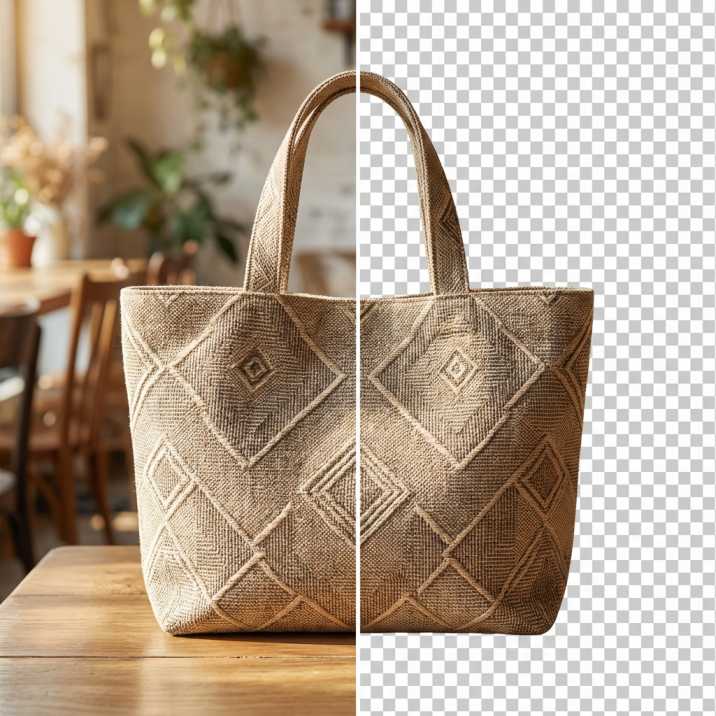
How Fashio AI's Remove Background Tool Handles Fashion-Specific Challenges
Fashio AI's Remove Background tool was built from the ground up for fashion imagery. Unlike general-purpose removers adapted for clothing as an afterthought, every component of the model was trained on fashion-specific data.
- Fabric-Aware Edge Detection — Specialized edge detection trained on tens of thousands of garment boundary examples across every fabric type, from structured denim to flowing silk. Preserves natural lace edges and chiffon hems instead of snapping to artificial hard edges.
- Transparency Handling — Generates accurate alpha channels for sheer and semi-transparent fabrics. A sheer blouse looks sheer in the output — not opaque, not erased. Critical for product accuracy.
- Color-Aware Separation — Handles low-contrast scenarios (white on white, black on black, nude on beige) by leveraging fashion-specific garment structure understanding, even when pixel color alone cannot determine the boundary.
- Marketplace-Ready Output — Every output meets compliance standards by default: pure white (RGB 255, 255, 255), appropriate product-to-frame ratio, and high-resolution output for both web and print.
See the Difference on Your Own Products
Upload a fashion product image and see the difference fashion-trained AI makes on your most challenging garments.
Start creating →Batch Processing: Working Through a Full Catalog
Background removal at the individual image level is a solved problem. The real challenge for fashion brands is batch processing — handling seasonal catalog drops, new collection launches, and ongoing SKU additions at volume.
Here is what a production-scale batch background removal workflow looks like:
- Image Preparation — Organize your source images by category (tops, bottoms, dresses, accessories) and photography type (flat lay, on-model, mannequin). This allows you to apply category-specific processing settings and quality-check outputs more efficiently.
- Batch Upload and Processing — Send your images to Fashio AI's background removal tool in runs rather than one at a time. Per-run upload limits vary by tool, so check the limit and split the catalog to match it. No manual queuing required within a run.
- Automated Quality Check — Fashio AI flags any images where confidence is below threshold — typically complex layered garments or unusual photography angles. These flagged images (usually 2–5% of the batch) receive additional processing passes or can be routed for manual review.
- Bulk Download and Integration — Download processed images in your required format (PNG with transparency, JPG on white background, or both). Output files maintain original naming conventions for seamless integration with your PIM, DAM, or e-commerce platform upload workflow.
For brands running seasonal catalogs of 2,000–10,000 images, this batch workflow replaces what would be 2–4 weeks of outsourced editing with a same-day process. Every image in the batch receives identical treatment, eliminating the variability that comes with human editors working at speed.
Beyond Removal: AI Background Replacement for Lifestyle Imagery
Clean white backgrounds are essential for primary product listings. But fashion marketing requires more. Lifestyle imagery — products shown in context, on location, in styled settings — drives engagement on social media, lookbooks, and editorial content.
AI background replacement takes the output of background removal and places your products into styled environments without a location shoot:
- Urban street scenes for streetwear and casual collections
- Studio environments with controlled lighting and shadow for premium positioning
- Seasonal settings — beach for summer, cozy interiors for winter — without shooting on location
- Brand-consistent backdrops that match your visual identity across every channel
A single product photo can generate a white-background marketplace listing, a lifestyle social media image, and a high-resolution catalog shot — all from one upload, all without a studio.
Cost Comparison: Manual Editing vs AI Background Removal
The economics of background removal at scale are decisive. Here is a direct comparison for a mid-size fashion brand processing 5,000 product images per month:
| Factor | Manual / Outsourced | AI Background Removal |
|---|---|---|
| Cost per image | $0.50–$3.00 | Fraction of manual cost |
| Monthly cost (5,000 images) | $2,500–$15,000 | Fixed subscription pricing |
| Turnaround per image | 12–48 hours | 2–5 seconds |
| Batch turnaround | 3–7 business days | Under 90 minutes |
| Consistency | Variable (multiple editors) | Identical processing every image |
| Revision rounds | 1–3 rounds typical | Instant re-processing if needed |
| Marketplace compliance | Manual verification required | Compliant by default |
| Scale flexibility | Lead time increases with volume | Linear scaling, no bottleneck |
The cost savings are significant, but the speed advantage matters more for competitive fashion brands. Getting products listed days or weeks faster means capturing early sales during trend windows. A delayed listing is a missed sale — and in fast fashion, that window does not reopen.
For brands currently spending $5,000+ per month on outsourced editing, switching to AI background removal typically pays for itself within the first batch. The ongoing savings compound as catalog size grows: doubling your SKU count does not double your image production cost.
Cut Your Image Production Costs Today
For brands currently spending $5,000+ per month on outsourced editing, switching to AI background removal typically pays for itself within the first batch.
Start creating →Building Your Background Removal Workflow: A Practical Checklist
Whether you are processing 50 images or 50,000, here is the workflow that leading fashion brands follow:
- Shoot with removal in mind — Consistent lighting and moderate contrast between product and background make AI processing more accurate. You do not need a perfect white backdrop — AI handles the rest — but avoid extreme shadows and color casts.
- Choose fashion-trained AI — Generic tools create rework. Use a background removal tool built for fashion to get production-ready outputs on the first pass.
- Process in batches — Group images by collection or category. Batch processing is faster and makes quality review more efficient than one-off processing.
- Verify marketplace compliance — Spot-check outputs against your target marketplace requirements before bulk upload. Fashion-trained AI should produce compliant images by default, but a 30-second check on a random sample prevents bulk rejections.
- Generate variants — From your clean background-removed image, generate white-background, transparent-background, and lifestyle-background variants for different channels — all from the same source file.
- Integrate with your stack — Connect your background removal workflow to your PIM or DAM system for automated processing of new product uploads. Eliminate the manual download-upload cycle entirely.
Frequently Asked Questions
Why do generic background removal tools fail on fashion images?
Generic tools are trained on broad image datasets and lack specialized understanding of fabric types, garment structures, and fashion-specific edge cases. Semi-transparent fabrics like chiffon, intricate details like lace and mesh, flowing edges on silk and pleated garments, and low-contrast scenarios (white on white) all cause generic models to produce inaccurate cutouts that require manual correction. Fashion-trained AI models solve these problems through specialized training data and architecture.
What is the Amazon white background requirement for product images?
Amazon requires main product images to have a pure white background at exactly RGB 255, 255, 255. The product must fill at least 85% of the image frame, with no watermarks, logos, text overlays, or visible mannequins. Non-compliant images trigger automated listing suppression, which can take days to resolve. Fashio AI's Remove Background tool outputs Amazon-compliant white backgrounds by default.
How accurate is AI background removal compared to manual Photoshop editing?
Fashion-trained AI handles standard garments cleanly and holds its edges far better than generic tools on lace, mesh, and layered fabrics, which is where almost all failures occur. The advantage is speed: AI returns an image in seconds, where the same cut-out done by hand in Photoshop takes minutes, which is what makes it cost-effective at scale.
Can AI remove backgrounds from flat lay product photos?
Yes. AI background removal handles flat lay, mannequin, and on-model photography. For flat lay shots specifically, fashion-trained AI accurately detects garment boundaries where fabric lies flat against the surface, preserving wrinkle details, natural fabric folds, and texture that generic tools tend to smooth out or clip incorrectly.
How many images can I process in a single batch?
Fashio AI processes background removal in batch runs rather than one image at a time, with per-run upload limits that vary by tool. Quality stays consistent across every image in a run — there is no degradation toward the end of a batch — so a seasonal catalog can be split into runs and worked through in order.
Is AI background removal quality high enough for print catalogs?
Yes, when using fashion-trained AI. Fashio AI produces high-resolution outputs suitable for both web and print. The critical factor is edge quality — fashion-specific models preserve fine garment details like stitching, texture, and silhouette at high resolutions, which generic tools cannot consistently match. Output resolution supports up to 4K for print-ready production.
How much can I save by switching from manual editing to AI background removal?
Manual or outsourced background removal costs $0.50–$3.00 per image with 12–48 hour turnaround. For a brand processing 5,000 images monthly, that is $2,500–$15,000 per month. AI background removal with Fashio AI costs a fraction of that with instant processing. Most brands see full ROI within their first batch, with savings compounding as catalog size grows. Start creating to calculate your specific savings.
How accurate is AI background removal compared to manual editing?
Fashion-trained AI background removal handles standard garments cleanly and holds its edges far better than generic tools on lace, mesh, and layered fabrics, which is where almost all failures occur. The key advantage is speed: AI returns an image in seconds, where the same cut-out done by hand in Photoshop takes minutes, which is what makes catalog-scale production practical.
How many images can AI background removal process in a batch?
Fashio AI processes background removal in batch runs rather than one image at a time, and per-run upload limits vary by tool. Output stays consistent across every image in a run, so a seasonal catalog can be worked through in sittings rather than queued image by image.
Is AI background removal good enough for print catalogs?
Yes, when using fashion-trained AI. Fashio AI outputs high-resolution images suitable for both web and print production. The key is edge quality — fashion-specific models preserve fine details like stitching, fabric texture, and garment silhouette at resolutions up to 4K, which generic tools cannot match consistently.
How much does AI background removal cost compared to outsourcing?
Manual background removal through outsourcing costs $0.50–$3.00 per image with 12–48 hour turnaround. AI background removal with Fashio AI costs a fraction per image with instant results. For a brand processing 5,000 images per month, AI saves $2,000–$14,000 monthly while delivering results in minutes instead of days.