See the Invisible Effect
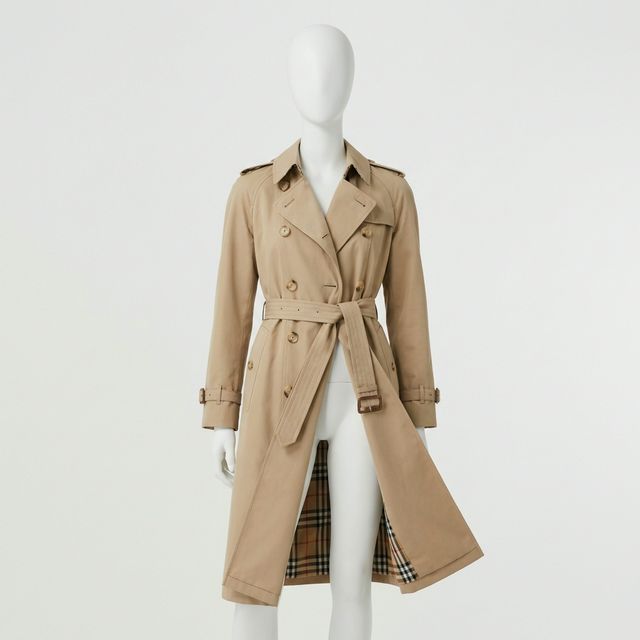
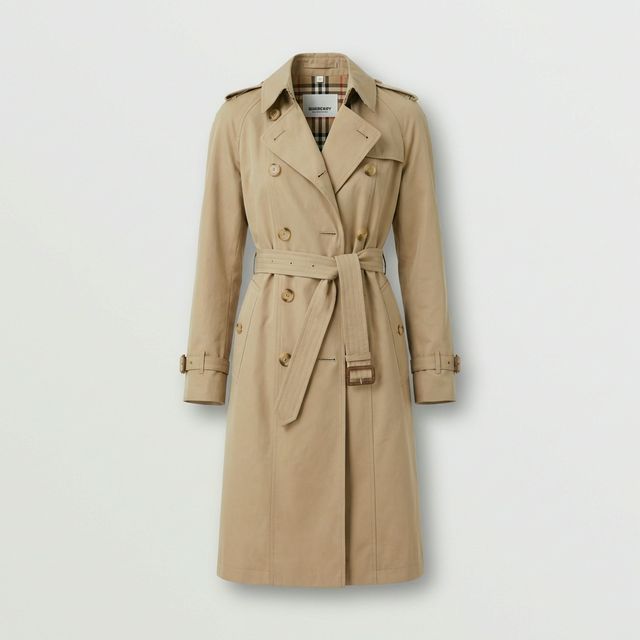
Mannequin removed, neck label reconstructed, and shape preserved.

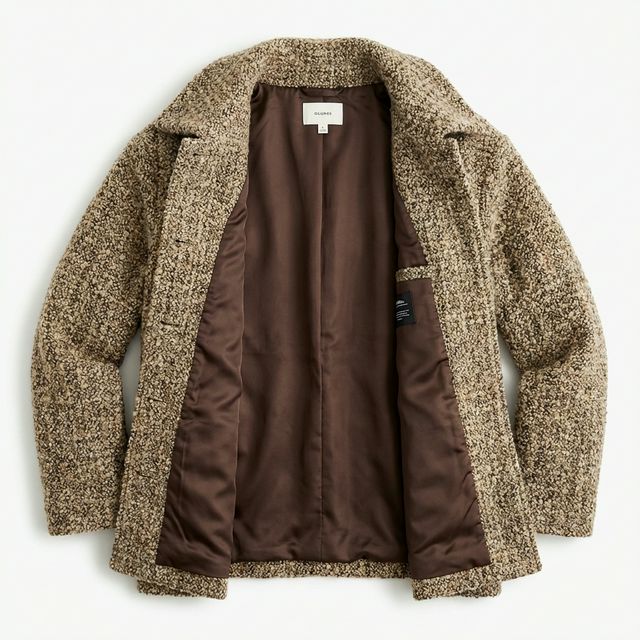
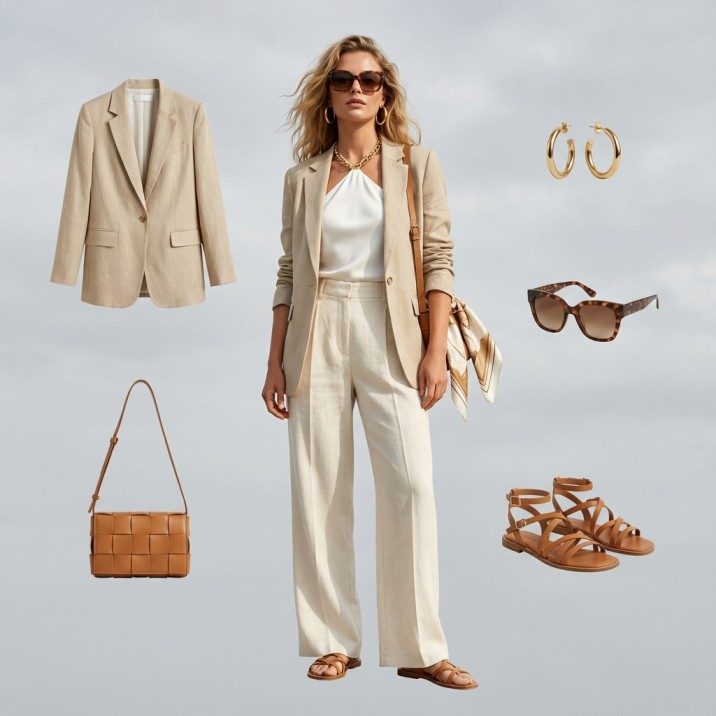
Amateur model shot transformed into professional e-commerce flat lay.
Turn Amateur Phone Photos into Professional Flat Lays
You don't need expensive models or studio setups. Take simple photos with your phone, and our AI will extract the garment, reconstruct the invisible mannequin, and create retail-ready flat lays in seconds.
- No professional lighting needed
- Works with any background
- Preserves natural fabric drape
- Instant catalog standardization
Perfectly reconstructed neck labels and inner linings.
Than manual clipping paths and photoshop retouching.
AI automatically centers and aligns crooked garments.
Manual Retouching vs. Fashio AI
Stop paying $10 per photo for "Neck Joint" services.
Professional Ghost Mannequin Features
Auto Neck Joint
Automatically reconstructs the inside neck label and collar area without needing a second photo.
Volume Retention
Keeps the natural 3D shape and drape of the clothing, unlike flat ironing.
Mannequin Removal
Detects and erases hands, legs, and neck stands instantly.
Symmetry Correction
Automatically fixes crooked styling and aligns shoulders and hems.
Shadow Generation
Adds realistic interior depth shadows for a premium 3D look.
Wrinkle Reduction
Smooths out minor creases while keeping fabric texture intact.
Batch Standardization
Ensures every product in your catalog is centered and sized identically.
Transparent Export
Download as PNG with transparency to place on any website background.
Standardize Your Catalog
Create a consistent, high-end look across all your product listings whether you shoot on mannequins, reliable models, or hangers.
Premium E-Commerce
The standard for high-end fashion retail (Net-a-Porter, Farfetch style) to focus purely on the garment.
Catalog Consistency
Eliminate distractions from different mannequin types or skin tones across your store.
Lookbooks
Create clean, floating product layouts for editorial and print marketing.
Wholesale Line Sheets
Present a professional, uniform collection to buyers without the cost of models.
Frequently Asked Questions

Turn mannequin photos into professional ghost mannequin product shots instantly. Remove the mannequin, see the inside label, and standardize your catalog with AI. Whether you run a Shopify store with 50 SKUs or manage a wholesale catalog with thousands of garments, Fashio AI's ghost mannequin app eliminates the most tedious step in apparel post-production — so you can list products faster and sell more.
What Is Ghost Mannequin Photography?
Ghost mannequin photography is a post-production technique used across fashion e-commerce to create the illusion that a garment is being worn by an invisible person. The process starts by photographing each item on a mannequin or dress form, which gives the fabric its natural shape and drape. In a second step — traditionally done by hand in Photoshop — the mannequin is carefully removed from the image. The result is a hollow, three-dimensional product shot that shows the neckline, inside label, and interior construction without any visible support.
This "invisible mannequin" look has become the industry standard for online fashion retailers, from Amazon and ASOS to independent Shopify stores. Unlike flat-lay photography, which presses garments flat against a surface, ghost mannequin photography preserves the volume and silhouette customers expect to see. Studies consistently show that 3D-style product images increase click-through rates and reduce return rates because shoppers get a more accurate sense of fit. If you sell clothing online, mastering ghost mannequin photography is no longer optional — it is a baseline requirement for competitive product listings.
How Fashio AI Ghost Mannequin Generator Works
Creating invisible mannequin photos with Fashio AI takes three simple steps — no Photoshop skills required.
Step 1 — Upload Your Mannequin Photo. Drag and drop a single image or an entire batch of mannequin shots into the Fashio AI dashboard. The tool accepts JPEG, PNG, and TIFF files at any resolution.
Step 2 — AI Removes the Mannequin While Preserving Garment Shape. Our deep-learning model detects the mannequin's neck, arms, and torso and erases them pixel by pixel. At the same time, it reconstructs the inside collar, neckline, and label area — even if you only shot one angle. The garment's natural drape, shadows, and fabric texture stay intact.
Step 3 — Download Your Clean Ghost Mannequin Image. In seconds you receive a polished product photo on a transparent or white background, ready for your website, marketplace listing, or print catalog. Need additional retouching? Pair the result with AI background removal or AI upscaling for pixel-perfect output.
Why Choose AI Over Manual Ghost Mannequin Editing
Traditional ghost mannequin editing is one of the most labor-intensive tasks in fashion photography post-production. A skilled retoucher typically spends 15 to 30 minutes per image — selecting the mannequin, masking edges, cloning missing collar areas, painting realistic interior shadows, and aligning everything so the garment looks natural. For a seasonal catalog of 500 SKUs, that adds up to over 125 hours of editing time and significant outsourcing costs.
Consistency is another challenge. When multiple editors work on the same catalog, subtle differences in shadow direction, edge hardness, and color grading create a patchwork look that undermines brand trust. Customers notice when some product images look sharp and others look hastily edited, and inconsistency erodes the premium feel of your store.
Fashio AI's ghost mannequin app solves both problems at once. Every image runs through the same trained model, so shadow depth, edge treatment, and centering are identical across your entire collection. Processing time drops from minutes to seconds per image, and you can batch-process hundreds of photos overnight. The result is a catalog that looks like it was retouched by one senior editor — at a fraction of the time and cost. Combined with our AI catalog creator, you can go from raw mannequin shots to a publish-ready product grid in a single afternoon.
Common Applications
E-Commerce Product Listings
Amazon, Shopify, eBay, and most major marketplaces either require or strongly recommend product images on a clean white background with no mannequin visible. Ghost mannequin photography meets these standards while showing the garment's true shape. Using AI to generate these images at scale means you can launch new collections faster and keep listings compliant without a dedicated retouching team.
Brand Catalogs
A consistent visual language is what separates premium brands from amateur sellers. When every product in your online store shares the same lighting, shadow style, and centering, shoppers browse longer and add more items to their carts. Fashio AI standardizes your entire catalog automatically, and you can further polish each shot with AI photo enhancement for a high-end editorial feel.
Wholesale & B2B Presentations
Buyers reviewing line sheets and wholesale portals make decisions in seconds. Clean ghost mannequin images on professional product sheets communicate quality and attention to detail. Pair ghost mannequin output with product to model AI when you need lifestyle shots for the same garment — covering both technical and marketing needs from a single source photo.
Ghost Mannequin Photography Tips
Choose the right mannequin size. The mannequin should match the garment's tagged size as closely as possible. An oversized mannequin stretches seams and distorts the silhouette, while an undersized one creates bunching that even AI cannot fully correct.
Use even, diffused lighting. Harsh directional light creates deep shadows in folds that make mannequin removal harder and produce less natural results. A two-softbox setup at 45 degrees on each side of the garment gives the flattest, most edit-friendly exposure.
Pin and clip from the back. Use bulldog clips and pins on the back of the garment to create a smooth front profile. Keep all clips hidden behind the mannequin so the AI has a clean front surface to work with.
Shoot at chest height on a tripod. A consistent camera angle across every product ensures uniform perspective in your final catalog. Chest-height framing minimizes lens distortion on collars and hems, giving the AI the best input for accurate mannequin removal.
Frequently Asked Questions
What garment types work with the ghost mannequin generator?
The tool handles t-shirts, dress shirts, blouses, jackets, blazers, coats, dresses, hoodies, and knitwear. It also supports bottoms like trousers and skirts when shot on a lower-body mannequin form. Structured garments with collars and lapels produce especially impressive results.
Can the AI show the inside label without a second photo?
Yes. Unlike traditional ghost mannequin editing that requires a separate interior shot, Fashio AI reconstructs the inside collar and label area from a single front-facing image. The AI has been trained on thousands of garment interiors and generates realistic neck-joint details automatically.
Does it support batch processing?
Absolutely. You can upload an entire season's collection — hundreds or even thousands of images — and the AI will process every file with identical settings. Batch processing is the fastest way to standardize a large catalog, and results are typically ready within minutes.
What is the output quality and resolution?
Fashio AI preserves the original resolution of your upload. If you shoot at 4000 x 6000 pixels, you receive a 4000 x 6000 pixel output. For images that need extra sharpness, run the result through our AI upscaling tool to double the resolution without artifacts.
How much does it cost?
Fashio AI offers a free tier so you can test the ghost mannequin generator on your own product photos before committing. Paid plans scale with volume and unlock batch processing, priority rendering, and API access for automated workflows. Check the dashboard for current pricing.
Related Guides
- Why Ghost Mannequin Photography is Outdated in 2026 — Why brands are replacing traditional ghost mannequin workflows with AI alternatives.
- 3D Ghost Mannequin Photography: How It Works — Workflow, software, and how AI changed the economics in 2026.
- Ghost Mannequin vs Invisible Mannequin: What's the Difference? — Terminology explainer for the same finished effect.
- Ghost Mannequin in Photoshop: Tutorial vs AI Workflow — Step-by-step Photoshop walkthrough compared with the AI workflow.
- Flat Lay Photography to On-Model: Complete AI Workflow — How to convert flat-lay product shots into on-model imagery.
- AI Product Photography: Complete Ecommerce Guide — End-to-end pillar guide on AI product photography for ecommerce.
Ready to upgrade your product photography? Try Fashio AI Free →