The 2026 Reality: Lookbooks Don't Need a Photoshoot Anymore
30-90 min vs 2-3 weeks $100 vs $3K-$15K per lookbook Unlimited revisions Same model across every look
AI lookbook generators compress the entire editorial production pipeline — casting, studio, photographer, post-production — into a single same-hour workflow. Same brand consistency, same editorial polish, none of the lead time.
For decades, the fashion lookbook was one of the most expensive deliverables on a brand's calendar. A single seasonal lookbook involved casting models, booking a studio or location, hiring a photographer plus crew, scheduling hair and makeup, shooting for one or two days, and then waiting another week or two for retouching. By the time the lookbook landed on the brand's website, the trend it was meant to capture had already moved.
The AI lookbook generator changes that math entirely. Modern fashion-trained AI can build a complete 10-15 look editorial lookbook — same model, same brand mood, same studio quality — in under an hour. No casting, no location, no post-production queue.
This guide breaks down what an AI lookbook generator actually does, how the workflow runs end to end, which tools are doing it well in 2026, and how brands are using AI lookbooks across ecommerce, social, paid ads, and wholesale.
What an AI Lookbook Generator Actually Does
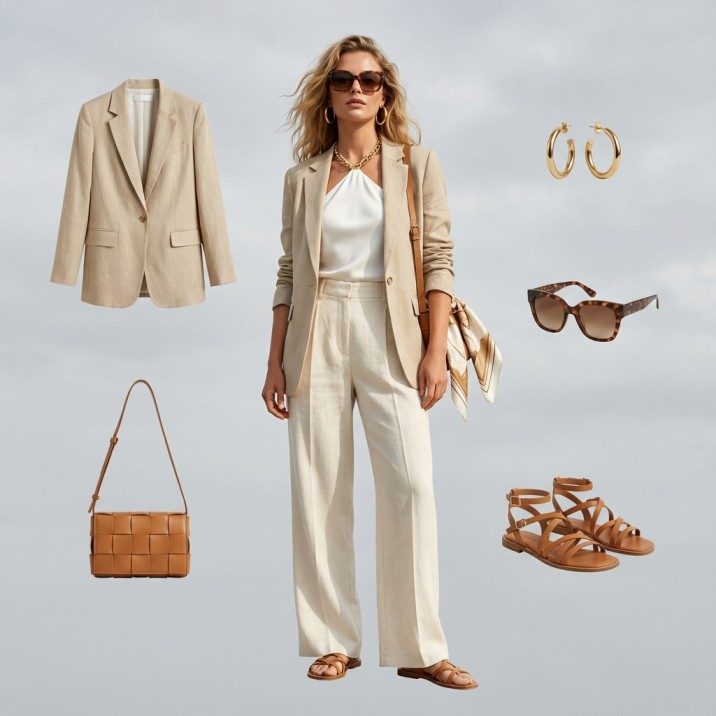
An AI lookbook generator isn't a single tool — it's a chained workflow that combines several fashion AI capabilities into one cohesive output. The deliverable is a complete editorial lookbook: a coordinated set of outfits photographed on consistent models in styled scenes, ready to publish.
The pipeline typically chains four steps:
| Step | Capability | What It Produces |
|---|---|---|
| 1. Model Creation | AI Fashion Model Generator | A consistent model identity (face, body, hair, age, ethnicity) reused across every look |
| 2. Garment Fitting | Virtual Try-On / Product to Model | Each outfit fitted onto the locked model with fabric accuracy and correct drape |
| 3. Pose Variation | Pose Variation tool | Editorial poses — walking, leaning, candid, three-quarter, full-length — across the set |
| 4. Scene Composition | Background / Image Editing | Studio backdrop, on-location feel, or branded backgrounds applied consistently across all images |
The end result is what fashion teams call a "lookbook" — a curated visual story showing how garments work together, on a recognizable model identity, in a unified visual tone.
Traditional Lookbook vs AI Lookbook — The Honest Comparison
- 2-3 weeks from brief to delivery
- $3,000-$15,000 typical budget for a 10-look set
- Model booking fees + day rates + usage rights
- Studio or location rental ($500-$2,000/day)
- Photographer + assistant + stylist + HMUA
- Revisions require a reshoot or expensive retouching
- Weather, mood, energy can all derail the day
- One delivery per shoot — no easy variations
- 30-90 minutes from upload to final lookbook
- Under $100 typical spend (often on a free tier)
- Full commercial rights, no model releases
- No studio, no location, no crew required
- One operator on one platform
- Unlimited revisions — re-generate any look instantly
- Same lighting, same mood, same model every time
- Generate seasonal, regional, or campaign variants from the same garments
The math doesn't even compare. A brand that produces six lookbooks a year traditionally spends $30K-$90K on production. The same six lookbooks in an AI workflow cost less than a month of one freelancer's retainer — and ship in a fraction of the time.
How to Build a Lookbook with AI — Step by Step
Here's the end-to-end workflow for producing a 10-look editorial lookbook using AI tools. The process is the same whether you're building a seasonal collection lookbook, a wholesale linesheet, or a campaign landing page.
-
Lock in a Consistent Model Identity
Start with the AI Fashion Model Generator and define your brand model. Describe age, ethnicity, body type, hair, expression, and overall vibe via text prompt. Save the model so the same face appears on every look. This single decision is what makes the final output feel like a lookbook instead of a random set of product shots.
-
Prepare Garment Inputs
Photograph each garment flat or on a mannequin in even lighting. If you only have mannequin shots, run them through Mannequin to Flat Lay first to clean them up. For flat lays, no extra prep needed — most AI lookbook workflows accept flat product images directly.
-
Fit Each Garment to the Locked Model
Use Virtual AI Fashion Try-On or Product to Model to fit each garment onto your saved model. Because the model identity is locked, every output preserves the same face and proportions while changing the outfit. This is where the lookbook starts to feel cohesive.
-
Vary the Poses for Editorial Range
Run each look through Pose Variation to generate 2-4 pose options per garment — front, three-quarter, walking, leaning, candid. A lookbook with pose variety reads as editorial; a lookbook of identical front-facing shots reads as a product catalog.
-
Unify the Scene and Mood
Apply a consistent backdrop using Remove Background + AI Image Editing. Choose a studio gray, a single location aesthetic, or a campaign-specific color palette and apply it across every look. The unified backdrop is what visually binds the lookbook together as one campaign.
The #1 reason AI lookbooks look unprofessional is using a different generated model on each look. Always lock one consistent character first, then run every garment against that same identity. This single step separates a lookbook from a folder of random outputs.
What Makes a Lookbook Actually Look Editorial
Most AI tools can produce a passable product-on-model image. Far fewer can produce a lookbook that reads as editorial. Three factors separate the two:
1. Character Consistency Across Every Frame
A lookbook isn't a slideshow of product shots — it's a story told through one model. If the face shifts subtly between looks, the viewer reads "stock photo set" instead of "campaign." Fashion-trained generators preserve face geometry across outputs; generalist image AIs don't.
2. Pose Range, Not Pose Repetition
Editorial lookbooks vary the framing — close-up portrait, full-length walking, seated three-quarter, candid mid-action. A lookbook of ten identical front-facing poses signals automation. A lookbook with deliberate pose variety signals direction.
3. A Single Visual Mood
The backdrop, lighting temperature, and color grade should be consistent across every look. Lookbooks that mix studio white, outdoor sunset, and neon street scenes break the campaign feel. Pick one mood and apply it to every frame.
A lookbook isn't ten product photos in a folder. It's one model, one mood, ten looks — told as a coordinated visual story. That's what AI lookbook generators have to deliver, and it's where most generic image AIs fail.
Use Cases — Where Brands Are Actually Using AI Lookbooks
AI lookbook generators aren't just for hero campaigns. Brands are deploying them across every channel where editorial-style imagery used to be too expensive to produce at the cadence they needed.
| Use Case | Old Cost / Lead Time | AI Workflow |
|---|---|---|
| Seasonal Lookbooks | $5K-$15K, 3-4 weeks | Refresh every drop in a single afternoon |
| Wholesale Linesheets | $3K-$8K per linesheet | One model, full collection, photoreal in 1 hour |
| Campaign Landing Pages | Custom shoot per campaign | Generate from existing flat-lays, ship same-day |
| Paid Ad Creative Sets | $500-$2K per creative round | 10-30 variants per look for A/B testing |
| Email Lookbooks | Often skipped due to cost | Weekly drop emails with fresh editorial imagery |
| Wholesale Pitch Decks | Stock photos or low-fi mockups | Branded model imagery for every SKU |
| Social Reels / TikTok | Separate video shoot day | Animate lookbook stills with Photo to Video |
The pattern is consistent: AI lookbooks aren't replacing one big shoot — they're filling every channel that used to go without editorial imagery because the budget didn't stretch that far.
What to Look for in an AI Lookbook Generator
Not every AI image tool can produce a true lookbook. When evaluating an AI lookbook generator for your brand, check for these specific capabilities:
- Locked character identity — Can you save a model and reuse the exact same face across every output? This is the deal-breaker. Without it, you don't have a lookbook.
- Fashion-trained outputs — Does the AI preserve garment details — seams, prints, fabric weight — or does it hallucinate generic clothing? Fashion-specific models matter here.
- Garment fitting accuracy — When the AI puts your dress on the model, does it look like your dress, or a vague approximation? Test with a printed garment to see how well details transfer.
- Pose control — Can you direct the pose, or are you stuck with whatever the AI generates? Editorial lookbooks need deliberate poses.
- Background and scene control — Can you set a unified backdrop, or does every output land in a different scene? Mood consistency requires scene control.
- Accessory support — Can the tool include bags, shoes, jewelry, and eyewear in the same lookbook, or is it clothing-only?
- Commercial license — Are outputs cleared for ads, ecommerce, and wholesale? Generalist AIs often aren't.
- Batch generation — Can you run 10-20 looks in one workflow, or does each frame need a manual setup?
Fashio AI Tools Used in a Lookbook Workflow
- AI Fashion Model Generator — lock in the consistent character
- Virtual AI Fashion Try-On — fit each garment to the locked model
- Product to Model — full looks including accessories
- Pose Variation — editorial pose range
- Mannequin to Flat Lay — clean up mannequin shots first
- Remove Background — unify the backdrop
- AI Image Editing — apply campaign mood and color grade
- Fashion Photo Upscale — export at print-ready resolution
- Photo to Video — animate the lookbook for social
From Stills to Motion — Turning a Lookbook into a Campaign
One of the most underused moves with an AI lookbook is converting it into video content for social. Every still in the lookbook becomes a Reel, TikTok, or YouTube Short with a single pass through Photo to Video:
- 9:16 vertical for Instagram Reels and TikTok
- 1:1 square for in-feed Instagram and Facebook ads
- 16:9 horizontal for YouTube Shorts mirror and pre-roll
- Music sync, brand kit application, and bulk export in one workflow
This is the multiplier most teams miss. A 10-look AI lookbook is also 10 social videos and 30+ ad variants — all from the same one-hour generation session, all with the same model and brand mood.
Common Lookbook Project Examples
Seasonal Drop Lookbook (12 looks)
A direct-to-consumer brand drops a new collection every six weeks. Each drop gets a lookbook — historically $4K-$6K per drop, three weeks turnaround. Moving to AI: same model identity carried across drops, 12 looks generated and live in 90 minutes, full year of seasonal lookbooks for less than one traditional shoot.
Wholesale Linesheet (40+ SKUs)
A wholesale brand needs every SKU on a model for the buyer linesheet. Traditional shoots cap out at 60-80 looks per studio day and require a separate fitting day. AI workflow: every SKU run through the same locked model, pose-varied, batch-rendered overnight, ready for buyer meetings the next morning.
Paid Ad Creative Refresh
A performance marketing team needs 30 fresh ad creatives every two weeks. AI lookbook workflow produces the source images; Photo Reframe exports each in the aspect ratios needed for Meta, TikTok, and YouTube; the same model and mood ensures brand consistency across the entire ad set.
What AI Lookbook Generators Won't Replace
For honesty: AI lookbook generators aren't a 100% replacement for every traditional shoot. The cases where a physical shoot still wins are narrow but real:
- Brand-defining hero campaigns — the big seasonal "this is who we are" image still benefits from a real photographer's eye, a real location, and a real director.
- Press and PR imagery for editorial features — some media still prefer or require traditional photography.
- Behind-the-scenes content — the "real" feel of a making-of video can't be faked.
- Influencer collaborations — the influencer is the subject; AI doesn't apply.
For everything else — and "everything else" is roughly 90% of what most brands actually publish — AI lookbook generators do the job in a fraction of the time and budget.
Build Your First AI Lookbook Free
Lock in a model identity, fit your garments, vary the poses, unify the mood — all on Fashio AI's free tier. No credit card, no watermarks, full commercial rights.
Start Your Lookbook →Pricing Reality Check
The pricing gap between traditional and AI lookbook production is the single biggest reason this workflow is reshaping fashion content. Here's the honest comparison for a 10-look editorial lookbook:
| Cost Bucket | Traditional Shoot | AI Lookbook |
|---|---|---|
| Model Day Rate | $800-$3,000 | $0 (no booking) |
| Photographer | $1,000-$5,000 | $0 (AI workflow) |
| Studio / Location | $500-$3,000 | $0 (digital backdrop) |
| Hair & Makeup | $300-$800 | $0 (AI handles styling) |
| Retouching | $500-$2,000 | $0 (clean output by default) |
| Usage Rights / Licensing | $0-$2,000/year | $0 (full ownership) |
| Software / Platform | n/a | $0-$100/month subscription |
| Total | $3,100-$15,800 | $0-$100 |
Even on the higher end of the AI workflow (premium plan, larger lookbook), the cost is roughly 2% of a comparable traditional shoot. That's not a marginal improvement — that's a category shift.
How AI Lookbook Generators Compare to Adjacent Tools
If you've explored AI fashion imagery before, you've probably seen tools that handle one part of the pipeline. Here's how the standalone tools compare to a full AI lookbook generator:
| Tool Type | What It Does | Lookbook-Ready? |
|---|---|---|
| Generic Image AI | Generates any image from a text prompt | No — no character lock, no garment accuracy |
| Virtual Try-On Only | Fits one garment onto a model | Partial — need to add pose, scene, identity lock |
| AI Model Generator Only | Creates a model image | Partial — need to add garments and poses |
| Background Remover Only | Cuts subjects out of photos | No — doesn't produce models or outfits |
| AI Fashion Platform (chained) | Combines model + try-on + pose + scene | Yes — full lookbook in one workflow |
The key insight: a true AI lookbook generator isn't a single tool — it's a chained pipeline. Brands that try to assemble it from separate point tools end up with character-drift, inconsistent moods, and slow workflows. Brands using an integrated fashion AI platform get the lookbook in one pass.
Going Deeper — Related Reading
If you're building out your AI fashion workflow, these guides cover specific pieces of the lookbook pipeline in depth:
- Best AI Fashion Model Generators Compared — picking the right tool for the character lock step
- How to Make AI Fashion Models Look Real & Consistent — the techniques that keep your lookbook model identity locked
- Outfit Generator AI Guide — building coordinated looks before the lookbook step
- Virtual Try-On AI Complete Guide — the garment-fitting step explained
- Flat Lay to On-Model AI Workflow — preparing inputs for AI lookbook generation
- AI Product Photography Complete Guide — broader context on AI imagery in ecommerce
Key Takeaways
- AI lookbook generators chain model creation, garment fitting, pose variation, and scene composition into one workflow
- 30-90 minute production time vs 2-3 weeks for a traditional shoot
- Cost drops from $3K-$15K per lookbook to under $100 on most plans
- Character consistency across every look is the single most important capability — it's what separates a lookbook from random product shots
- Best use cases: seasonal drops, wholesale linesheets, campaign landing pages, paid ad creatives, weekly email lookbooks
- AI lookbook stills convert directly into social video with Photo to Video — 10 looks = 10 Reels with no extra shoot
- Traditional shoots still win for brand-defining hero campaigns, PR features, and BTS content — but that's roughly 10% of what most brands actually publish
Try the Full Lookbook Workflow on Fashio AI
14 fashion AI tools — model generator, try-on, pose variation, scene control, video — under one free tier. Build your first complete lookbook today.
Try Fashio AI Free →FAQ: AI Lookbook Generators
What is an AI lookbook generator?
An AI lookbook generator is a chained workflow that combines AI model generation, garment fitting, pose control, and scene composition to produce a complete editorial fashion lookbook without a physical photoshoot. The output is a coordinated set of outfits on a consistent AI model, ready to publish across ecommerce, social, ads, and wholesale.
How long does it take to create a lookbook with AI?
A 10-15 look digital lookbook can be generated in 30-90 minutes with AI, compared to 2-3 weeks for a traditional photoshoot. The time saved comes from skipping casting, location booking, studio rental, and post-production retouching — AI handles all of that in a single workflow.
Are AI-generated lookbooks suitable for ecommerce and marketing?
Yes. AI-generated lookbooks are used for ecommerce category pages, lookbook landing pages, social media campaigns, paid ad creatives, email marketing, wholesale linesheets, and seasonal campaign visuals. Outputs from fashion-trained platforms like Fashio AI are commercially licensed, watermark-free, and visually indistinguishable from traditional editorial photography.
Can I keep the same model across an entire lookbook?
Yes — character consistency is the biggest advantage of dedicated AI lookbook generators. Tools like Fashio AI's AI Fashion Model Generator let you lock in a model's identity (facial features, body type, hair, age, ethnicity) and reuse the exact same character across every look in the lookbook for full brand consistency.
Do AI lookbooks work for accessories and jewelry?
Yes. AI lookbook workflows handle complete looks — full outfits plus accessories, bags, shoes, jewelry, and eyewear. The Product to Model tool styles accessories alongside garments so a single lookbook can include rings, handbags, sunglasses, and footwear styled on the same consistent model.
How much does an AI lookbook cost vs a traditional shoot?
A traditional 10-look editorial shoot costs $3,000-$15,000 (model booking, photographer, studio, hair/makeup, location, retouching). An equivalent AI lookbook on Fashio AI can be produced on a free or low-cost plan — total spend is typically under $100 even for premium output, including unlimited revisions and full commercial rights.
Can AI lookbooks be turned into video content?
Yes. Once still lookbook images are generated, Photo to Video animates them into short-form social videos with motion, music sync, and aspect ratios for Reels, TikTok, and YouTube Shorts. One AI lookbook session produces both the still campaign and the matching video content — no separate shoot day.
What's the difference between an AI lookbook generator and a virtual try-on?
A virtual try-on fits one garment onto one model image — useful for product pages but not a lookbook. An AI lookbook generator chains try-on with consistent model identity, pose variation, and scene composition across a full set of looks. The lookbook output is editorial; the try-on output is transactional.
