
Your Shopify Store,
On Autopilot.
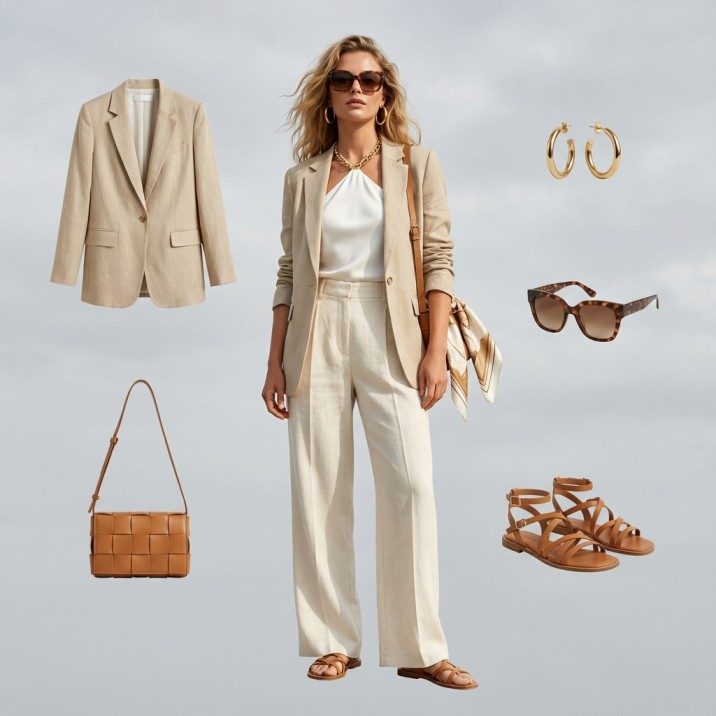
Automatically generate on-model photography for every new product you add to Shopify. Sync descriptions, SEO tags, and visuals in one click.
No spam. You'll be notified when the plugin is live.
Auto-Sync Products
Connect your store once. As soon as you add a raw product photo, Fashio detects it and generates editorial campaigns in the background.
Instant Push to Store
Review generated images in our dashboard and push them directly to your Shopify product variants with a single click.
SEO & Meta Tags
Our AI analyzes your image to generate SEO-friendly Alt Text and product descriptions, automatically updating your Shopify fields.
Seamless Workflow

Connect your Shopify store to Fashio AI and generate professional product photography automatically. Sync products, enhance images, and publish — without leaving your workflow.
How the Shopify Integration Works
Step 1: Connect Your Store
Install the Fashio app from the Shopify App Store and connect your store in one click. Your product catalog syncs automatically.
Step 2: Generate AI Photography
Select products and choose what you need: AI model shots, background removal, upscaling, or video content. Process individual items or entire collections in batch.
Step 3: Publish Back to Shopify
Enhanced images sync directly to your Shopify product listings. Alt tags, SEO metadata, and image optimization are handled automatically.
What You Can Do With Fashio + Shopify
Replace Product Photography
Stop outsourcing photo shoots. Generate on-model imagery, lifestyle shots, and marketplace-compliant backgrounds from the flat lays you already have.
Scale Your Catalog
Launching 50 new products? Generate consistent, professional imagery for every SKU in a single session. Same model, same style, same quality — across your entire collection.
Create Social & Ad Content
Turn any product listing into TikTok and Reels content or UGC-style video ads. One product photo becomes an entire content campaign.
Optimize for Marketplace Compliance
Automatic white backgrounds, proper aspect ratios, and high-resolution output that meets Amazon, Google Shopping, and Shopify's image requirements.
Built for Fashion Brands on Shopify
Fashio isn't a generic image tool bolted onto Shopify. It's a fashion-specific AI platform with a native Shopify integration. Every feature — from virtual try-on to catalog creation — is designed for the way fashion brands sell online.
Frequently Asked Questions
Is the Shopify integration free?
The integration itself is free. You use your Fashio credits for AI processing — and every new account starts with free credits.
Does it work with Shopify Plus?
Yes. Fashio integrates with all Shopify plans including Shopify Plus and Shopify Enterprise.
Can I process my entire product catalog at once?
Yes. Batch processing lets you enhance or regenerate imagery for your entire catalog in one run.
Will it affect my store's loading speed?
No. All image processing happens on Fashio's servers. We deliver optimized, web-ready images that actually improve your page load times.
How does pricing work for Shopify users?
The Fashio Shopify app is free to install. You pay only for the AI image generations you use, with credits that refresh monthly on subscription plans. New stores start with free credits — enough to test the integration on a typical 30-50 SKU collection before committing to a paid plan.
How does the app handle a large catalog?
Products are generated one at a time — there is no batch processor or queue. For a large catalog that means working through it in sittings, with your model, background, and lighting settings carried over so the output stays consistent from the first SKU to the last.
Does it work with Shopify Markets and multi-currency stores?
Yes. The app is region-aware and respects your Shopify Markets configuration. Generated images sync to all your storefronts simultaneously, and SEO metadata can be localized per market if you have translations enabled.
Can I revert changes if I don't like the AI output?
Yes. Every original image is preserved in the Fashio dashboard. You can restore the original product photo with one click, or generate alternative variations until you find the right look. Changes only push to Shopify after you approve them.
How Fashio Compares to Other Shopify Photography Apps
| Capability | Fashio AI | Generic Photo Apps | Manual Photography |
|---|---|---|---|
| Fashion-trained AI | ✓ | ✗ | n/a |
| AI model generation | ✓ | ✗ | Hire models |
| Background removal | ✓ | Partial | Manual editing |
| Batch processing (1000+ SKUs) | ✓ | Limited | Impossible |
| Direct Shopify sync | ✓ | Some | Manual upload |
| Cost per SKU | $0.50–$2 | $1–$5 | $50–$300 |
| Time per SKU | < 1 minute | 5–10 minutes | Hours to days |
| Marketplace compliance | Auto | Manual | Manual |
The differentiator is fashion training. General photography apps treat a t-shirt the same as a kitchen blender — same edge detection, same enhancement model. Fashio's AI is trained specifically on fabric, drape, and garment construction. The output quality on apparel is meaningfully higher because the model understands what it is looking at.
For brands looking at competitor apps like Syncio, Photoroom, or Pixc — those tools handle generic ecommerce well but lack the AI model generation and fashion-specific training that Fashio provides. If you sell apparel, footwear, accessories, or intimate apparel, fashion-specific tooling delivers better conversion-ready imagery.
Setting Up the Shopify Integration
Setup takes under 10 minutes from start to first generated image:
1. Install from Shopify App Store. Search for "Fashio AI" in the Shopify App Store and click Install. Approve the standard Shopify permissions for product catalog access and image upload.
2. Connect your Fashio account. Sign in or create a free Fashio account during installation. Your free credits activate immediately.
3. Sync your product catalog. The app pulls your existing product images into the Fashio dashboard. Sync runs in the background — most catalogs complete in under 5 minutes.
4. Generate your first batch. Select a few products to test, choose the workflow (background removal, AI model generation, or full transformation), and run. First results return in 30-60 seconds.
5. Approve and publish. Review the AI output in the Fashio dashboard. Approved images push back to your Shopify products with one click, including alt text, SEO metadata, and proper aspect ratios.
Use Cases by Fashion Category
The Shopify integration is optimized for the breadth of fashion ecommerce categories sold on Shopify:
- Apparel (tops, dresses, outerwear) — Convert flat-lays to on-model with diverse AI models in any pose. Pair with virtual try-on for size-inclusive product pages.
- Footwear — Generate on-foot photography from product-only shots. Multiple angles per SKU without re-shooting.
- Accessories (bags, jewelry, watches) — Use Product to Model AI to place jewelry on a realistic model. Bags photographed on a model rather than just on white.
- Intimate apparel — The Bra AI Generator handles lingerie and swimwear with fashion-trained models that don't trip generic AI content filters.
- Activewear — Dynamic poses, athletic body types, and motion-implied shots with pose variation.
Workflow Examples
Daily new product launch. Brand uploads 5-10 new flat-lay shots each morning. Shopify integration auto-runs the full workflow — model generation, background standardization, upscaling — and publishes by 11 AM. From product photo to live listing in under 2 hours.
Seasonal collection drop. Brand prepares a 200-SKU spring collection. Single batch run generates on-model imagery + flat-lay variants + lifestyle shots for every SKU, all sharing consistent model selection and styling. Total turnaround: 4-6 hours instead of 4-6 weeks of traditional production.
Catalog refresh. Brand has 1,500 products with photography from 2-3 years ago. Quarterly refresh runs through Fashio in a single weekend session, modernizing every product page without touching any physical inventory.
Marketplace expansion. Same brand wants to launch on Amazon, Google Shopping, and ASOS. Fashio reformats existing Shopify imagery to each marketplace's specific requirements (white background, aspect ratio, resolution) in batch.
Why Brands Switch From Other Shopify Photography Workflows
The teams that move from traditional photo studios or generic Shopify apps to Fashio cite three consistent reasons:
Speed. Catalog turnaround drops from weeks to hours. New product launches stop being bottlenecked by photography production.
Consistency. Reusing one model, background, and lighting setup keeps a whole collection visually coherent. No more catalog mix where some shots look studio-quality and others look like phone snapshots.
Cost compression. Per-SKU production cost drops 80-95%. A 500-SKU collection that used to require a $25,000 photoshoot now runs $1,000-$3,000 in AI credits.
The retention pattern shows brands typically expand usage after their first month — once teams see the speed, they start using the integration for content beyond just product pages: social ads, email campaigns, lookbooks, and lifestyle content.
Related Resources
- Shopify Product Photography with AI: Complete Guide — Pillar guide on AI photography workflows for Shopify stores.
- AI Product Photography: Complete Ecommerce Guide — Cross-platform pillar on AI ecommerce photography.
- 12 Best AI Tools for Fashion Brands in 2026 — Tested comparison of fashion AI tools.
Ready to automate your Shopify photography? Connect Your Store →