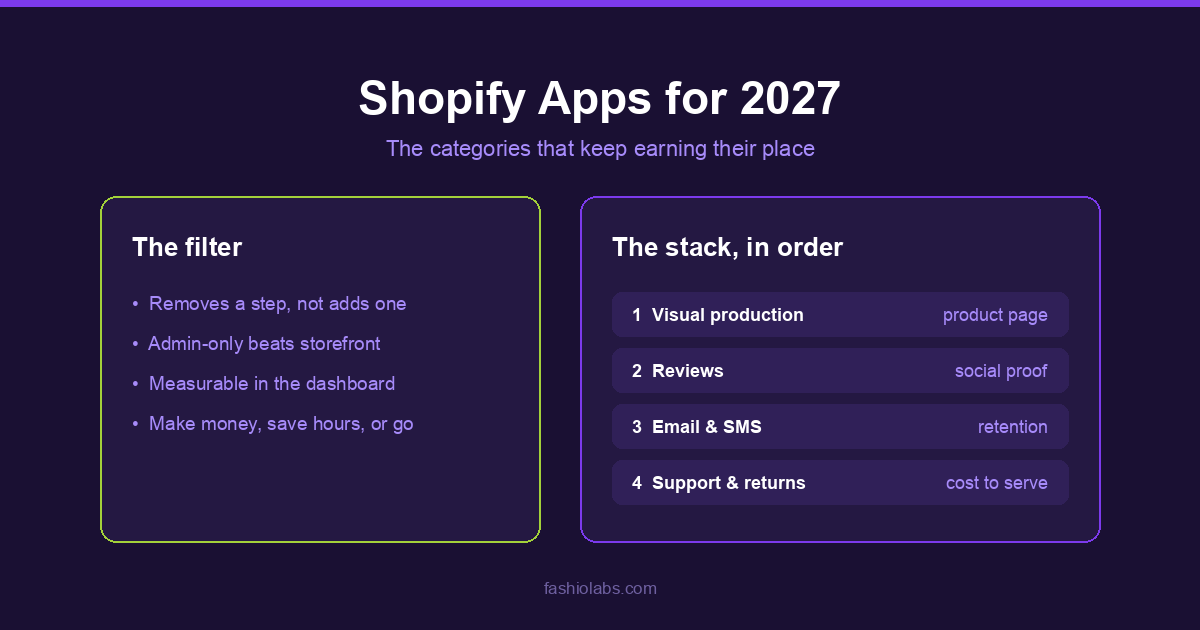
Most "best Shopify apps" lists are a directory with adjectives. This one is a forecast: the categories that will still be earning their place in a merchant's stack in 2027, why, and the order worth installing them in. Named apps are examples of a category, not rankings — the category is the durable part.
Key Takeaways
- Visual production moved into the admin. The apps that win are the ones that let you finish a task where you already are, instead of exporting to a second tool
- Storefront apps cost page speed; admin apps do not. That difference will decide a lot of uninstalls in 2027
- Retention beats acquisition at current ad prices, which keeps email, reviews and subscriptions permanently in the stack
- "AI" as a category is over. By 2027 it is a feature of everything, and an app that sells the label rather than an outcome is a bad buy
- A useful filter: an app should make money, save hours, or be removed
How this list was built
Three questions, applied to every category:
| Question | Why it decides survival |
|---|---|
| Does it remove a step, or add one? | Apps that create a second place to work get abandoned within a quarter |
| Does it touch the storefront? | Storefront scripts are a permanent tax on page speed; admin-only tools are not |
| Is the outcome measurable in the Shopify dashboard? | If you cannot see it in conversion, revenue or hours saved, the renewal is a habit rather than a decision |
1. Visual production — inside the admin
The single largest gap on an apparel product page is imagery, and the reason it stays a gap is logistics: a photoshoot is a booking, a location, a model and a two-week turnaround per drop. That equation does not work for a store adding twenty SKUs a month.
What changed is where the work happens. Generating imagery is no longer a separate tool you export to — it opens from a product page, works from the photo already attached to that product, and writes the result back into the product's media.
Admin-only 1 permission ~$0.75 / image
Adds two entries to a product's More actions menu: generate a single on-model image, or run a full catalogue shoot against that product. Results carry an Add to product button. Asks for products access only, and bills through your Fashio account rather than your Shopify invoice.
The category test for 2027: does it work from the image you already have, and does it put the result back where you need it? A generator that returns a download folder has moved the work, not removed it.
2. Reviews and social proof
Reviews survive every stack purge because they do two jobs at once — they answer the sizing and quality questions that block a purchase, and they feed structured data that can earn rich results in search. Judge.me, Loox and Yotpo are the names most merchants encounter here.
What to watch in 2027: photo and video reviews are now the format that carries weight, because a written review of a garment answers less than one photo of it on a real body.
3. Email and SMS retention
At current acquisition costs, the second sale is where the margin is. Klaviyo is the default for a reason; the category itself is not going anywhere.
Abandoned cart, browse abandonment, post-purchase, and a back-in-stock alert. A store with those four running beats a store with thirty half-configured campaigns.
4. Customer support and inbox
Support tooling — Gorgias, Shopify Inbox and their peers — is where AI assistance landed first and stuck, because the volume is repetitive and the cost of a slow reply is a cancelled order. Expect the 2027 version to draft rather than send, with a human on the button.
5. Subscriptions and repeat purchase
Recharge and the subscription category apply to a narrower set of catalogues than the vendors suggest — consumables, not one-off apparel. Where it fits, it changes the business model. Where it does not, it is a monthly fee for a widget nobody clicks.
6. Page building and merchandising
PageFly and similar builders solve a real problem: theme customisation without a developer. They also carry the clearest version of the storefront-script tax, so this is the category to audit hardest against page speed.
7. Search and discovery
On a catalogue past a few hundred SKUs, native search becomes the reason people leave. Search apps pay for themselves at the point where your collection pages stop being browsable — and not much before it.
8. Loyalty and referral
Loyalty works when repeat purchase is already happening and you want to accelerate it. Installed as a fix for weak first-purchase conversion, it does nothing, which is the most common way this category gets wasted.
9. Shipping, returns and post-purchase
Returns are the quiet margin killer in apparel, and most of them trace back to fit and expectation — which means the fix often lives on the product page, not in the returns portal. A returns app makes the process cheaper to run; better imagery and sizing information make it happen less.
10. Analytics beyond the built-in dashboard
Shopify's own analytics answer "what happened". The category that survives answers "why", and specifically which product pages lose people. That is where the next set of fixes comes from.
11. Bulk operations and data
Matrixify and the bulk-editing category are unglamorous and permanent. Any store past a few hundred SKUs eventually needs to change one field across all of them, and doing it by hand is how a weekend disappears.
The install order
- Fix the product page first. Imagery, then reviews. Everything downstream is amplification of a page that either converts or does not.
- Then capture the traffic you already paid for. Email and SMS flows, with the four core automations running.
- Then reduce the cost of serving. Support tooling and returns, once volume makes them worth the seat.
- Then optimise. Search, loyalty, analytics — these sharpen a working machine and cannot start one.
An app should make money, save hours, or be removed. Most stacks fail the third clause.
Start with the product page
Generate on-model imagery from the photo already on your product, and add it back to the listing without leaving Shopify.
Start creating →Frequently Asked Questions
How many apps should a Shopify store run?
Fewer than most stores do. Every app that injects script into the storefront costs page speed, and page speed is both a ranking and a conversion factor. Audit the list quarterly against the make-money / save-hours test.
Which app should a new fashion store install first?
Whatever fixes the weakest part of the product page, which for most apparel stores is the imagery. A shopper who cannot picture the garment on a body does not add it to cart, and no email or review app recovers that.
Do Shopify apps slow down a store?
Storefront apps can, because they add scripts to pages your customers load. Admin-only apps generally do not — they run inside the Shopify admin rather than on the storefront.
Is "AI" still a useful app category in 2027?
No. It is a feature of nearly everything by then. Judge an app on the outcome it produces, not on the label it uses.
- Fashio for Shopify — what it does, and what it deliberately does not
- How to install the Fashio Shopify app
- Shopify product photography — sizes, setup and requirements
- 12 best AI tools for fashion brands