
Free browser extension for fashion sellers · Updated November 25, 2026
Product image checker for Amazon, Etsy, Shopify, eBay and Zalando listings
Fashio Listing Helper checks every product photo on a page against the marketplace's image guidance, counts your listing text against its limits and builds a size chart you can paste into the description. It is free, needs no account, sends nothing anywhere and works in Chrome, Edge, Firefox, Opera and Brave.

Install the product image checker
Chrome Web Store
Chrome, Brave, Opera, Vivaldi, Arc
In store review, link coming soon
Microsoft Edge Add-ons
Edge
In store review, link coming soon
Firefox Add-ons
Firefox (desktop and Android)
In store review, link coming soon
After installing, pin the extension, open a product page and click the icon. Choose your marketplace at the top of the panel; the choice is remembered.
Product image audit against marketplace rules
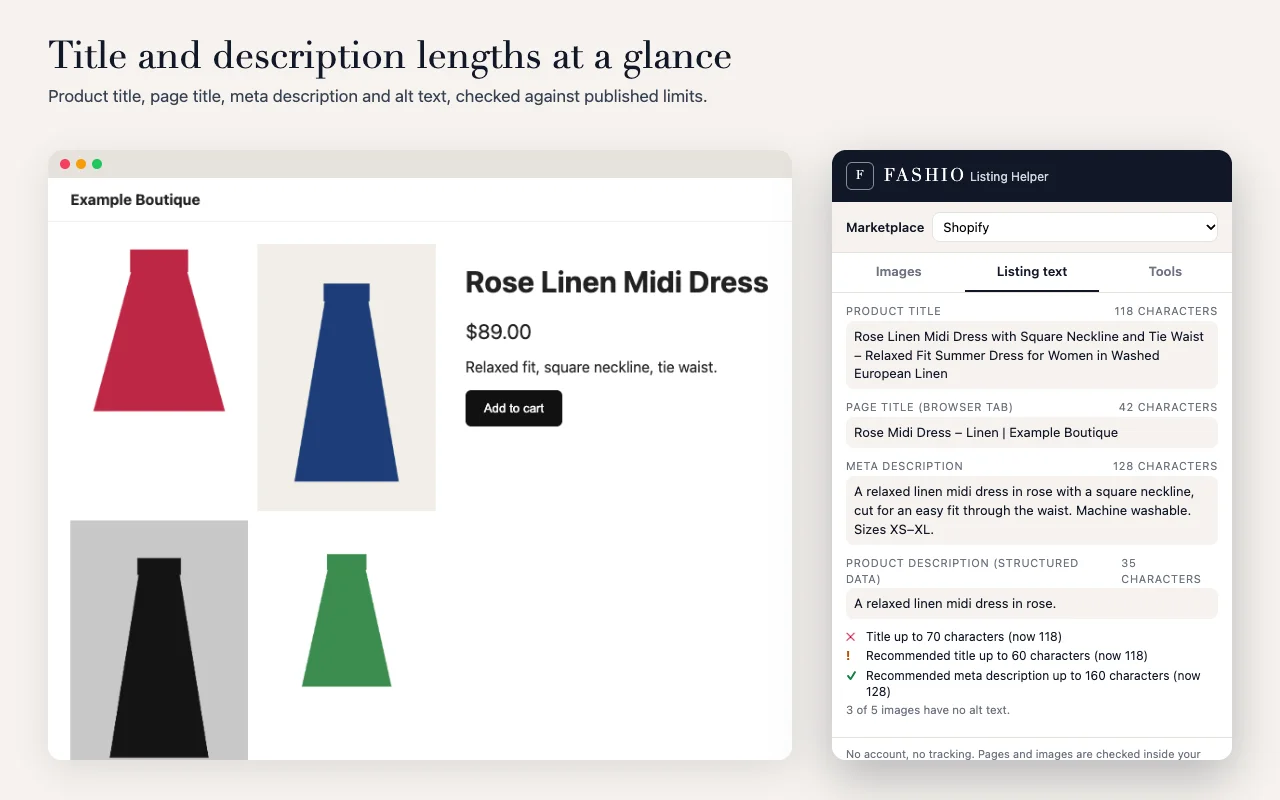
Open any product page, your own store, a draft preview or a live listing, and click the Fashio icon. Every large product photo is listed with its pixel size, aspect ratio and file size, and checked against the marketplace you pick. The main image is also checked for a white background and how much of the frame the product fills. Each rule links to the help page it came from.
Where each number comes from, and how to make one master photo serve every channel, is in our guide to product image sizes for Amazon, eBay, Etsy and Shopify.
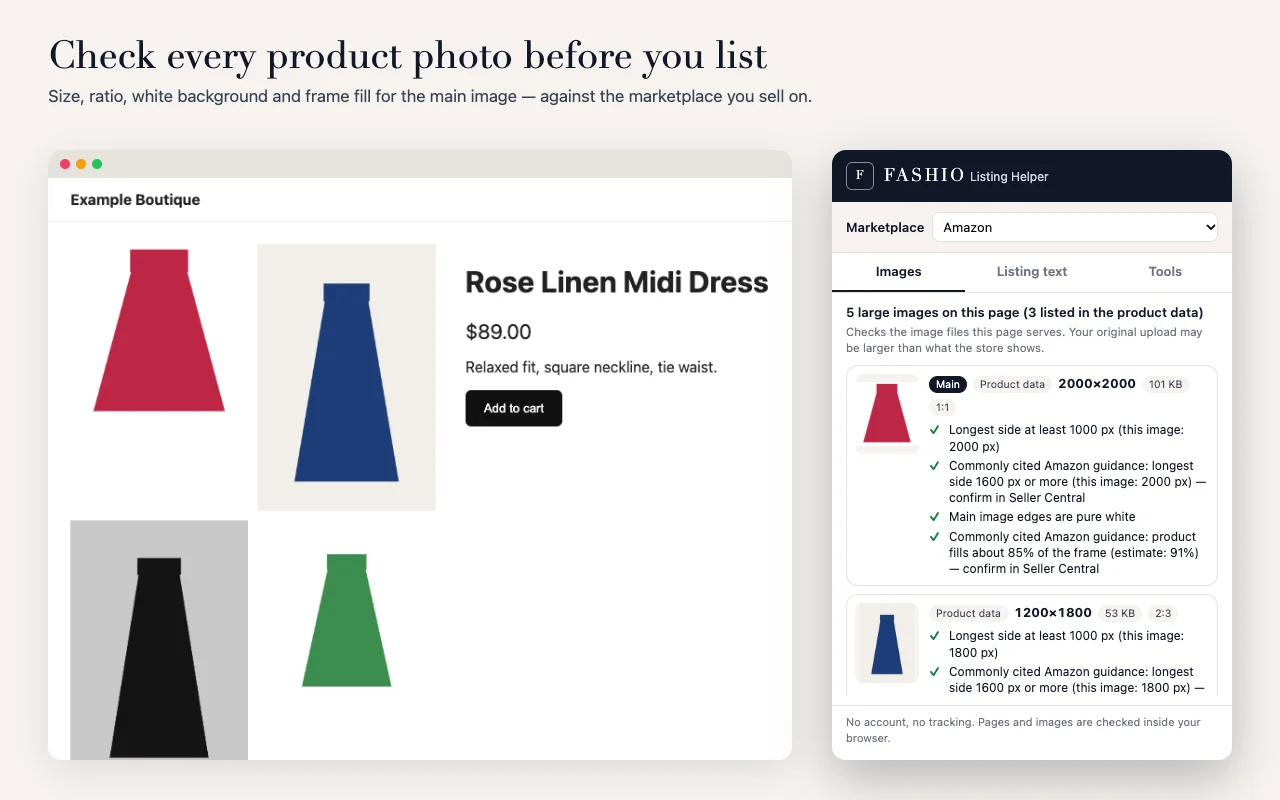
Aspect ratio and size warnings before the marketplace rejects them
Photos that are too small for zoom, the wrong shape for a portrait marketplace such as Zalando, or too heavy to upload are flagged in red or amber with the exact number they missed. Images listed in the product's structured data that return an error, and photos with no alt text, are flagged too. Click a thumbnail to jump to the photo on the page.
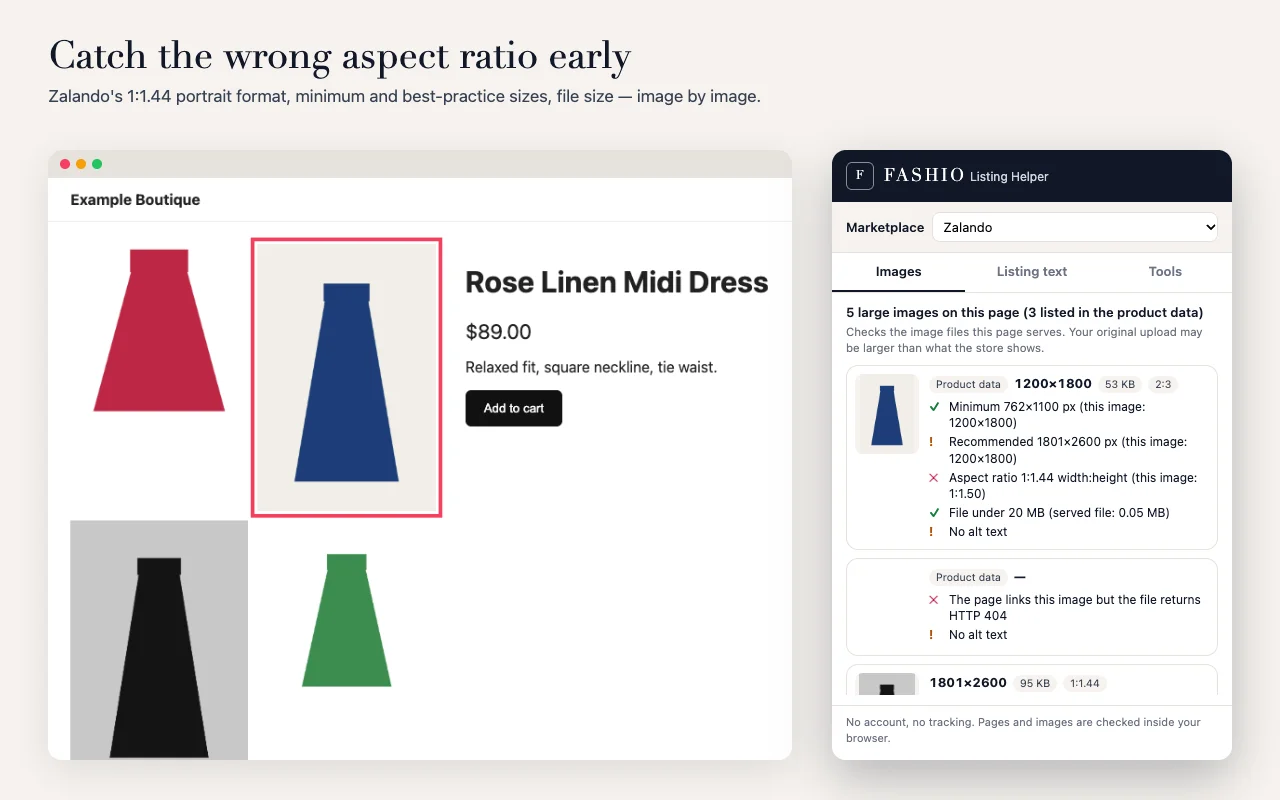
Listing title and description length
The product title, page title, meta description and structured-data description are shown with their character counts and checked against the published limits, such as Etsy's 140-character and eBay's 80-character title limits and Shopify's search-result lengths.
Size chart builder for clothing listings
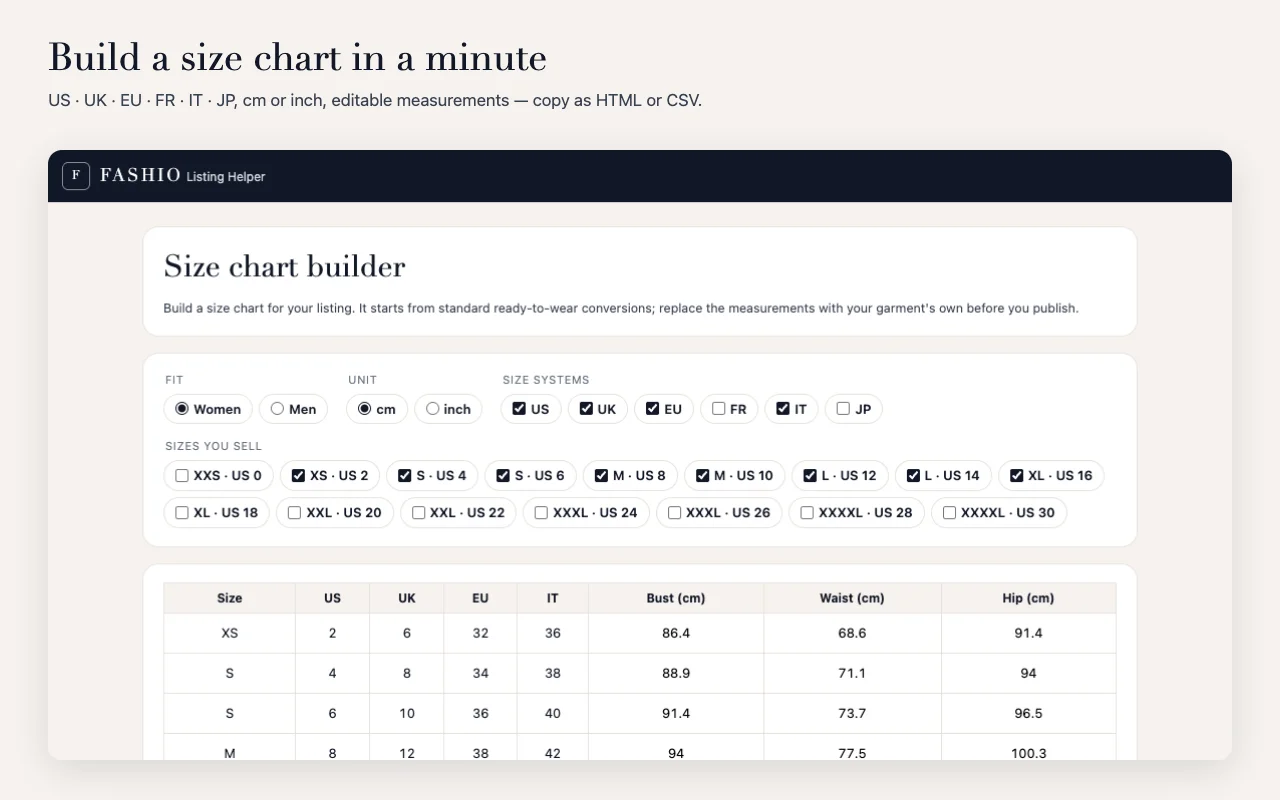
Build a women's or men's size chart with US, UK, EU, FR, IT and JP sizes and bust, waist and hip (or chest, waist and neck) in cm or inches. Every cell is editable, so you can put in your garment's real measurements, then copy it as HTML for your product description or as CSV. The starting values are the same standard conversions as the size charts on this site.
For plus sizes, the XXXL and XXXXL size chart shows how far 3XL and 4XL differ between brands.
From a flat product photo to an on-model photo
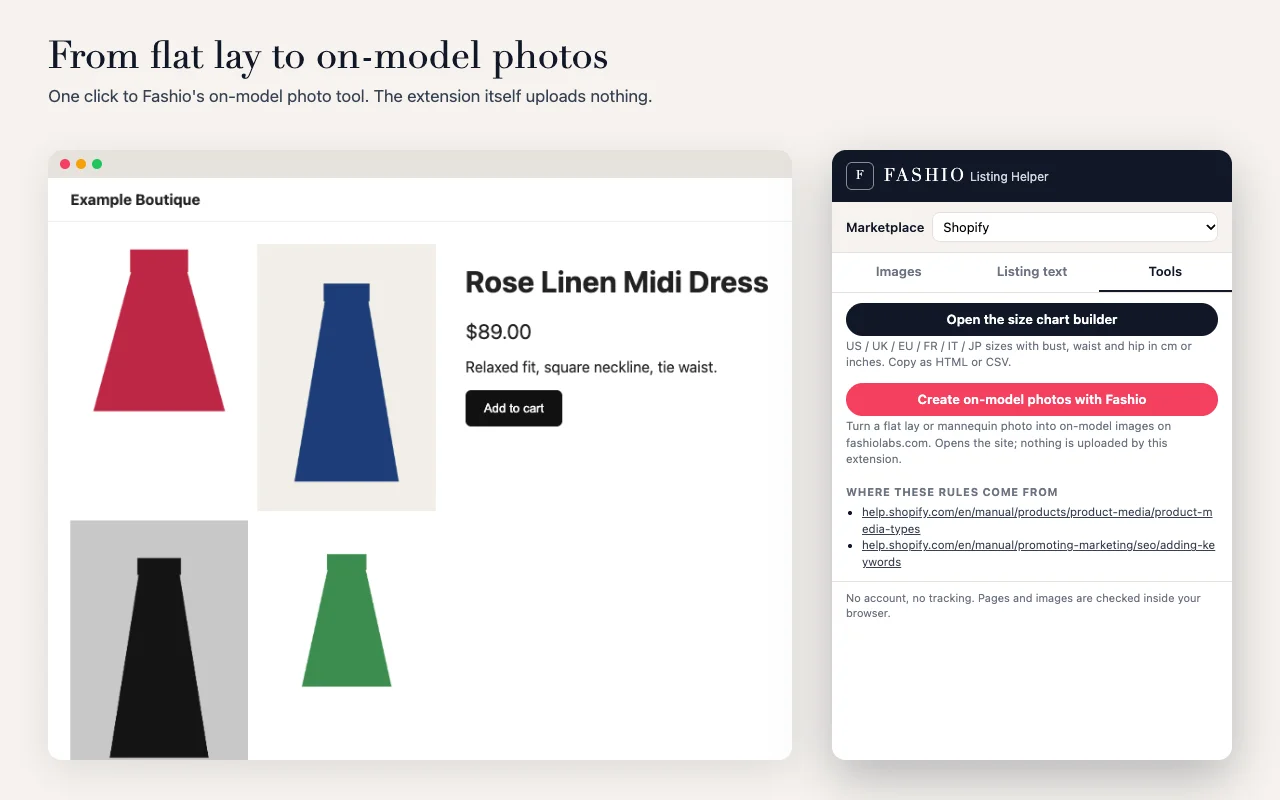
Right-click any product image and choose "Create an on-model photo with Fashio" to open Fashio's on-model photo tool. The extension itself uploads nothing; you choose the photo on fashiolabs.com, under your own plan.
See what the AI fashion model generator does with a flat lay or mannequin shot.
Marketplace image rules the extension checks
Marketplaces change their guidance; the extension links each rule to its source so you can confirm the current number.
| Marketplace | What is checked | Source |
|---|---|---|
| Amazon | 1,000 px minimum and 1,600 px recommended on the longest side, white main image, product filling about 85% of the frame | Commonly cited figures from Amazon's seller forums; the official page needs a Seller Central login, so confirm there |
| Etsy | 635 px minimum, 2,000 px recommended on the shortest side; title up to 140 characters | Etsy Help Center |
| Shopify | 2,048 × 2,048 px recommended, 5,000 × 5,000 px and 20 MB maximum; search title about 60–70 characters, meta description about 160 | Shopify Help Center |
| eBay | 500 px minimum and 1,600 px recommended on the longest side, 12 MB maximum; title up to 80 characters | eBay picture policy and developer docs |
| Zalando | 762 × 1,100 px minimum, 1,801 × 2,600 px recommended, 1:1.44 portrait ratio, 20 MB maximum | Zalando Partner University image guidelines |
Privacy policy for the extension
Applies to Fashio Listing Helper, version 1.0 and later. Last updated November 25, 2026.
- The extension collects no personal data. There is no account, no analytics, no advertising and no tracking. Nothing about the pages you check, your products or your listings is sent to Fashio or anyone else.
- To measure a photo, the extension downloads that image file from wherever the page already loads it (your store or its image CDN), exactly as your browser does when it shows the page. The file is measured in memory and discarded; it is never uploaded.
- Reading images hosted on a different server needs your permission for all sites. The extension asks for it only when you click "Allow image reading", and you can withdraw it at any time in your browser's extension settings.
- The only thing stored is the marketplace you last picked, in your browser's own extension storage. Removing the extension deletes it.
- The right-click "Create an on-model photo" item only opens a fashiolabs.com page in a new tab; it passes no image or page address.
- From version 1.0.1 the extension also counts, on your device only, on how many different days you have used it, so that after five days it can show a one-time link to rate it in the store. The count is never sent anywhere, and it is deleted when you uninstall the extension.
- When you install or uninstall the extension, your browser opens this page. Like the rest of fashiolabs.com, the page itself uses the analytics described in our privacy policy; the extension does not.
- The source code is public and MIT-licensed, so anyone can check these statements.
Source code: github.com/fashiolabs/fashio-extension. The website itself is covered by the Fashio privacy policy.
Listing Helper extension: frequently asked questions
Is the Fashio Listing Helper extension free?
Yes. The extension is free, has no paid features and needs no account. Creating on-model photos on fashiolabs.com is a separate, paid Fashio plan.
Which marketplaces does the product image checker support?
Amazon, Etsy, Shopify, eBay and Zalando. Each preset uses that marketplace's published image guidance and links to it. Amazon's figures are commonly cited numbers from its seller forums, because the official page needs a Seller Central login; confirm them there.
Why does the extension say my photo is smaller than the file I uploaded?
It measures the image the page actually serves. Many stores resize or compress uploads for display, so your original file may be larger. Check the original in your store admin if a photo is flagged.
Does a passing check mean the marketplace will accept my listing?
No. It checks the published size, ratio, file size, background and text-length guidance. Marketplaces also review content, category rules and image quality in ways no checklist covers.
Are the size chart conversions exact?
They are standard ready-to-wear conversions, and brands vary by up to a full size. Replace the measurements with your garment's own before publishing the chart.
Does it work on any store platform?
It reads any product page in the browser, including Shopify, WooCommerce, Etsy, eBay and Amazon listings and custom stores. Pages that load photos only after you scroll may need a scroll before you open the panel.